背景:
转眼2021要结束了,我在《赶海王》也只剩下最后一个版本。测试策划们都在忙于提交版本,而我想起了原本想用的addressables打包方式,于是便稍作研究,写了一个类似MotionFramework思路的自动打包工具,只是对关键节点做一些调整就可以完成。开始之前可以先移步学习一下MotionFramework的思路。
https://github.com/gmhevinci/MotionFramework
收集规则(AddressablesCollectorSetting):
需要实现的类包括:
- AddressablesCollectorSetting : ScriptableObject,可视化编辑的配置
- AddressablesCollectorSettingWindow,可视化编辑的UI
- IFilterRule,过滤规则及部分实现,CollectAll,CollectScene等
- IPackRule,打包规则,PackExplicit,PackDirectory
实现方式基本保持了MotionFramework中实现并无多大改动:
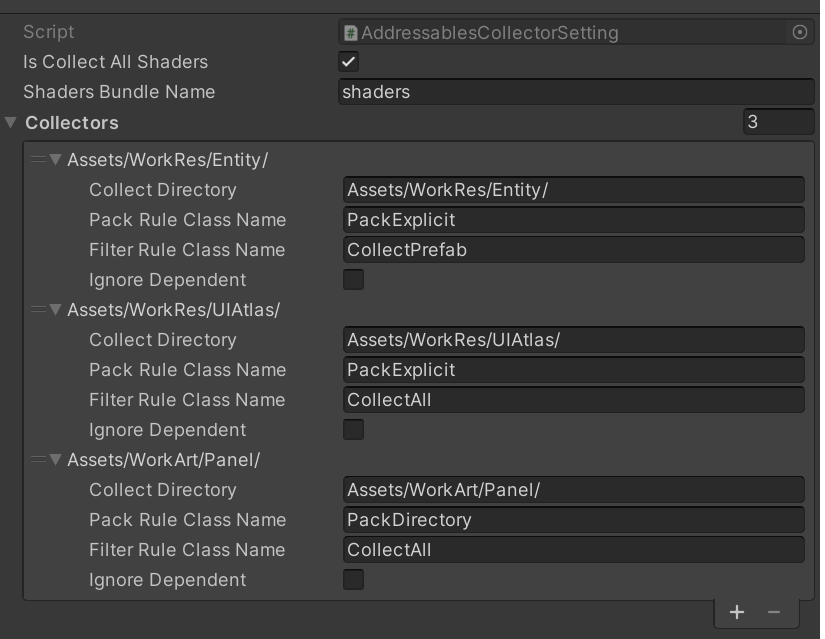
打包过程拆解:
需要实现的类包括:
- TaskPrepare,主要判断配置及打包的前置条件
public class TaskPrepare : BuildTask { public TaskPrepare(AddressablesBuilder builder):base(builder) { output = new BuildTaskOutput(); } public override BuildTaskOutput Run() { StartupParameters parameters = builder.StartupParameters; // 检测构建平台是否合法 if (parameters.BuildTarget == BuildTarget.NoTarget) throw new Exception("请选择目标平台"); if (parameters.BuildVersion < 0) throw new Exception("请先设置版本号"); // 检测资源收集配置文件 if (AddressablesCollectorSettingData.GetCollecterCount() == 0) throw new Exception("配置的资源收集路径为空!"); output.IsSuccess = true; Debug.Log($"Build Prepare"); return output; } } - TaskGenerateBuildMap,根据配置文件找到需要打包的资源并给他们设置Group
/// <summary> /// 获取构建的资源列表 /// </summary> private List<AssetInfo> GetBuildAssets() { Dictionary<string, AssetInfo> buildAssets = new Dictionary<string, AssetInfo>(); Dictionary<string, string> references = new Dictionary<string, string>(); // 1. 获取主动收集的资源 List<AssetCollectInfo> allCollectAssets = AddressablesCollectorSettingData.GetAllCollectAssets(); // 2. 对收集的资源进行依赖分析 int progressValue = 0; foreach (AssetCollectInfo collectInfo in allCollectAssets) { string mainAssetPath = collectInfo.AssetPath; List<AssetInfo> depends = GetDependencies(collectInfo); for (int i = 0; i < depends.Count; i++) { AssetInfo assetInfo = depends[i]; if (buildAssets.ContainsKey(assetInfo.AssetPath)) { buildAssets[assetInfo.AssetPath].DependCount++; if (assetInfo.GroupName != AddressablesCollectorSettingData.CollectGroupDefault) { buildAssets[assetInfo.AssetPath].RenameGroupName(assetInfo.GroupName); } } else { buildAssets.Add(assetInfo.AssetPath, assetInfo); references.Add(assetInfo.AssetPath, mainAssetPath); } // 注意:检测是否为主动收集资源 if (assetInfo.AssetPath == mainAssetPath) { buildAssets[mainAssetPath].IsCollectAsset = true; } } EditorTools.DisplayProgressBar("依赖文件分析", ++progressValue, allCollectAssets.Count); } EditorTools.ClearProgressBar(); // 3. 移除零依赖的资源 List<AssetInfo> undependentAssets = new List<AssetInfo>(); foreach (KeyValuePair<string, AssetInfo> pair in buildAssets) { if (pair.Value.IsCollectAsset) continue; if (pair.Value.DependCount == 0) undependentAssets.Add(pair.Value); } foreach (var assetInfo in undependentAssets) { buildAssets.Remove(assetInfo.AssetPath); } // 4. 设置资源标签 progressValue = 0; foreach (KeyValuePair<string, AssetInfo> pair in buildAssets) { var assetInfo = pair.Value; // assetInfo.SetBundleLabel(assetInfo.AssetPath); EditorTools.DisplayProgressBar("设置资源标签", ++progressValue, buildAssets.Count); } EditorTools.ClearProgressBar(); // 5. 补充零依赖的资源 foreach (var assetInfo in undependentAssets) { var referenceAssetPath = references[assetInfo.AssetPath]; var referenceAssetInfo = buildAssets[referenceAssetPath]; // assetInfo.SetBundleLabel(referenceAssetInfo.AssetBundleLabel); buildAssets.Add(assetInfo.AssetPath, assetInfo); } // 6. 返回结果 return buildAssets.Values.ToList(); } - TaskBuildAdressables,进行打包参数设置,其实最大的区别在这个步骤
private AddressableAssetGroup GetOrCreateGroup(AddressableAssetSettings settings, string groupName)
		{
			AddressableAssetGroup group = settings.FindGroup(groupName);
			if (group == null)
			{
				group = settings.CreateGroup(groupName, false, false, false, null);
			}
			else
			{
				return group;
			}

			var bundleSchema = group.GetSchema<BundledAssetGroupSchema>();
			if (bundleSchema == null)
			{
				bundleSchema = group.AddSchema<BundledAssetGroupSchema>();
				bundleSchema.BuildPath.SetVariableByName(settings, AddressableAssetSettings.kLocalBuildPath);
				bundleSchema.LoadPath.SetVariableByName(settings, AddressableAssetSettings.kLocalLoadPath);

				bundleSchema.BundleMode = BundledAssetGroupSchema.BundlePackingMode.PackSeparately;
				bundleSchema.Compression = BundledAssetGroupSchema.BundleCompressionMode.LZ4;
			}

			var updateSchema = group.GetSchema<ContentUpdateGroupSchema>();
			if (updateSchema == null)
			{
				updateSchema = group.AddSchema<ContentUpdateGroupSchema>();
				updateSchema.StaticContent = true;
			}

			return group;
		}
public override BuildTaskOutput Run() { var settings = AddressablesBuilder.Settings; BuildTaskBuildMapOutput buildMapOutput = builder.GetBuildTaskOut<BuildTaskBuildMapOutput>(typeof(TaskGenerateBuildMap)); var assets = buildMapOutput.BuildAssets; foreach (var asset in assets) { string groupName = asset.GroupName; AddressableAssetGroup group = GetOrCreateGroup(settings, groupName); if (group == null) continue; var assetGUID = AssetDatabase.AssetPathToGUID(asset.AssetPath); AddressableAssetEntry entry = settings.CreateOrMoveEntry(assetGUID, group, false, false); string name = asset.AssetPath.RemoveExtension(); entry.address = name; } AddressableAssetSettings.BuildPlayerContent(); output.IsSuccess = true; return output; }注意:分组的规则大致是PackDirectory单独设置一个打包组,其他都放到默认组中,当组名放生冲突的时候,优先PackDirectory组
- TaskBuildPackage,没有什么东西,就是打包
- TaskCleanAddressables,清空addressables参数设置
public override BuildTaskOutput Run()
		{
			AddressableAssetSettings.CleanPlayerContent(null);
			BuildCache.PurgeCache(false);

			var setting = AddressablesBuilder.Settings;

			var groups = setting.groups;
			for (int i = groups.Count - 1; i >= 0; i--)
			{
				setting.RemoveGroup(groups[i]);
			}

			string cachePath = setting.RemoteCatalogLoadPath.GetValue(setting);
			if (Directory.Exists(cachePath))
			{
				Directory.Delete(cachePath, true);
			}

                        EditorUtility.SetDirty(setting);
                        AssetDatabase.SaveAssets();

			output.IsSuccess = true;
			return output;
		}
打包入口:
最后找个打包的入口
[MenuItem("Tools/TBuild")]
	public static void TBuild()
	{
		AddressablesBuilder.AddressablesBuilder builder = new AddressablesBuilder.AddressablesBuilder();

		StartupParameters bp = new StartupParameters();
		bp.BuildTarget = BuildTarget.Android;
		bp.BuildVersion = 1;
		bp.BuildPackage = true;

		builder.Run(bp);
	}

文章评论